P n
Payment Instructions
Step-by-step animated guide for paying fees via bKash & Cellfin
bKash Payment
Pay school fees quickly with bKash
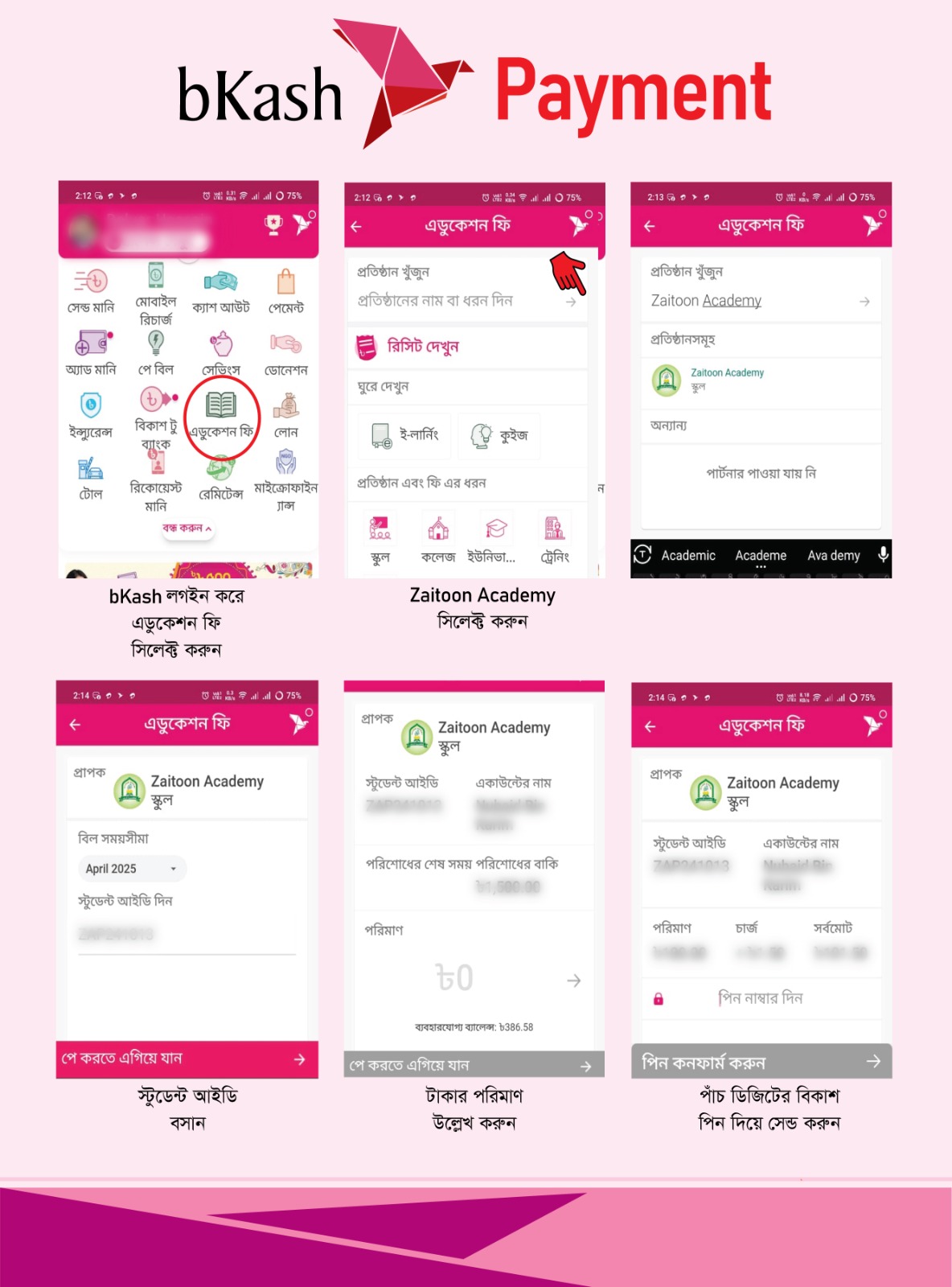
- 1Open bKash app and loginFollow the screenshots to the right for visual help.
- 2Choose 'Education Fee' (একাডেমিক ফি)Follow the screenshots to the right for visual help.
- 3Search and select 'Zaitoon Academy'Follow the screenshots to the right for visual help.
- 4Enter Student ID and amountFollow the screenshots to the right for visual help.
- 5Confirm with your bKash PINFollow the screenshots to the right for visual help.
Quick tip: Keep the Student ID ready and always confirm the institute name before sending any payment.
Secure · Fast · Traceable
Follow steps carefully
Helpful Contacts
Support: zaitoonacademy.bd@gmail.com | Phone: +880 1748806492
Safety Reminder
Never share your OTP or PIN. Always verify the institute name and fee amount.